Anker Prime Charging Docking Station (14-in-1, Dual Display, 160W)

Anker Prime Charging Docking Station (14-in-1, Dual Display, 160W)

Highlight

 
  • 14-in-1 Connectivity: Bring together all your devices with a 14-in-1 solution, perfect for charging, transferring data quickly, and managing dual displays.
  • Shared Charging Output: Up to 160W total across compatible charging connections. Each USB-C charging connection supports up to 100W individually and USB-A up to 12W; all four charging connections share up to 157W.
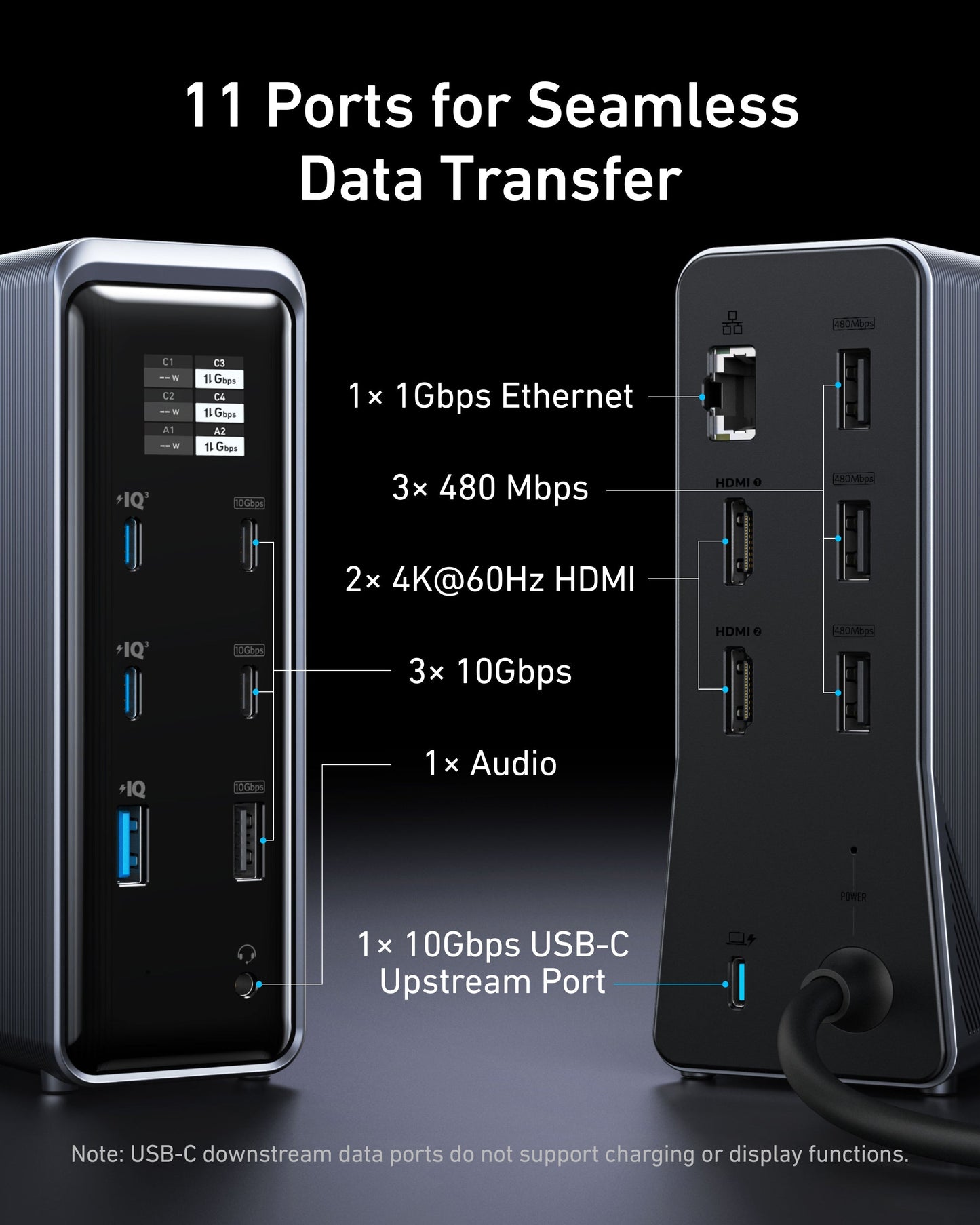
  • Data and Display Connections: Two USB-C and one USB-A data ports support up to 10Gbps; three additional USB-A data ports support up to 480Mbps. Dual HDMI output depends on the host system; macOS external monitors mirror the same content.
  • Smart Display: Receive immediate visual feedback on power levels, connection statuses, and important alerts, keeping your devices in prime condition.

Description


The Anker Prime A83B6 is a 14-in-1 desktop dock that combines laptop connectivity, device charging and a status display in one vertical unit.

Power and connections

  • Up to 100W charging through the USB-C laptop connection.
  • Two dedicated USB-C charging ports, each up to 100W individually, plus a USB-A charging port up to 12W. Power is shared: up to 160W overall, or 157W with all four charging connections in use.
  • Two USB-C and one USB-A data ports up to 10Gbps, plus three USB-A data ports up to 480Mbps.
  • Dual HDMI outputs, Gigabit Ethernet and a 3.5 mm audio connection.

Check display and port compatibility

Your laptop's USB-C port must support DisplayPort Alt Mode for video. HDMI output supports up to 4K; attainable resolution and refresh rate depend on the host and display setup. On macOS, both external monitors show the same content, rather than separate extended desktops. That shared view can differ from the laptop screen.

Downstream USB-C data ports do not support charging or video output. Ports marked IQ are charging-only and do not transfer data. Use the included USB-C upstream cable to connect the dock to your laptop.

This dock does not support monitors with a resolution of 5120 × 1440.

<p>Earn%20[points_amount]%20when%20completing%20this%20purchase.</p>
Skip to product information
1 of 6

Anker Prime Charging Docking Station (14-in-1, Dual Display, 160W)

Regular price $ 269.99
Regular price Sale price $ 269.99
Sale Sold out
Regular price $ 269.99
Regular price Sale price $ 269.99
Sale Sold out
Shipping calculated at checkout.
 

Highlight

 
  • 14-in-1 Connectivity: Bring together all your devices with a 14-in-1 solution, perfect for charging, transferring data quickly, and managing dual displays.
  • Shared Charging Output: Up to 160W total across compatible charging connections. Each USB-C charging connection supports up to 100W individually and USB-A up to 12W; all four charging connections share up to 157W.
  • Data and Display Connections: Two USB-C and one USB-A data ports support up to 10Gbps; three additional USB-A data ports support up to 480Mbps. Dual HDMI output depends on the host system; macOS external monitors mirror the same content.
  • Smart Display: Receive immediate visual feedback on power levels, connection statuses, and important alerts, keeping your devices in prime condition.

Description


The Anker Prime A83B6 is a 14-in-1 desktop dock that combines laptop connectivity, device charging and a status display in one vertical unit.

Power and connections

  • Up to 100W charging through the USB-C laptop connection.
  • Two dedicated USB-C charging ports, each up to 100W individually, plus a USB-A charging port up to 12W. Power is shared: up to 160W overall, or 157W with all four charging connections in use.
  • Two USB-C and one USB-A data ports up to 10Gbps, plus three USB-A data ports up to 480Mbps.
  • Dual HDMI outputs, Gigabit Ethernet and a 3.5 mm audio connection.

Check display and port compatibility

Your laptop's USB-C port must support DisplayPort Alt Mode for video. HDMI output supports up to 4K; attainable resolution and refresh rate depend on the host and display setup. On macOS, both external monitors show the same content, rather than separate extended desktops. That shared view can differ from the laptop screen.

Downstream USB-C data ports do not support charging or video output. Ports marked IQ are charging-only and do not transfer data. Use the included USB-C upstream cable to connect the dock to your laptop.

This dock does not support monitors with a resolution of 5120 × 1440.

<p>Earn%20[points_amount]%20when%20completing%20this%20purchase.</p>
View full details